




Description
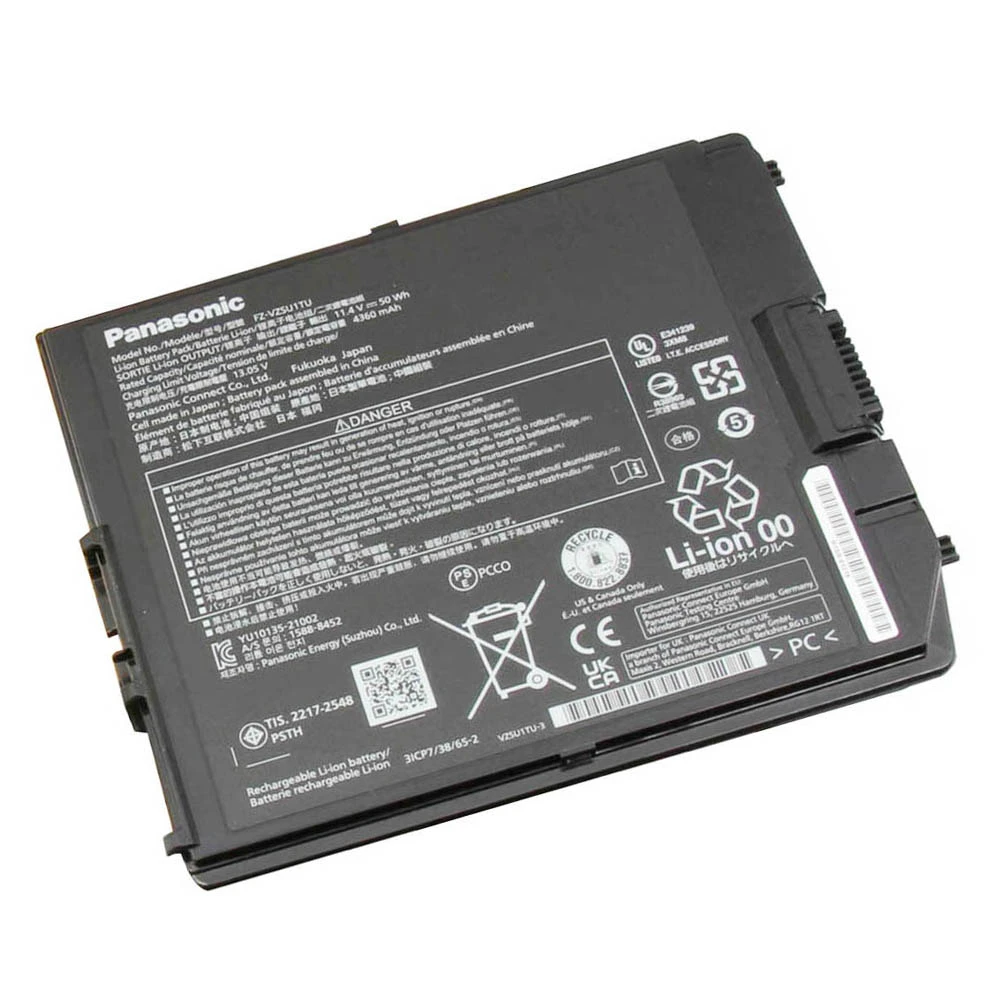
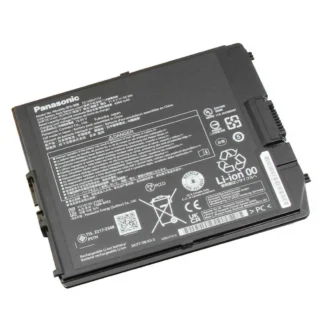
50Wh FZ-VZSU1TU Battery for Panasonic Toughbook FZ-G2 and TOUGHBOOK G2 Lite Series
This 50Wh Panasonic FZ-VZSU1TU battery is designed for compatible Panasonic
Toughbook G2 tablets and 2-in-1 devices, including selected FZ-G2,
FZ-G2E, FZ-G2K, FZ-G2D, and
TOUGHBOOK G2 Lite models. It is a suitable replacement when your current battery
drains quickly, no longer holds a charge, or your Panasonic Toughbook G2 needs reliable portable
power again.
With an 11.4V output voltage, 4360mAh / 50Wh capacity, and
1-cell battery design, this battery supports field service, diagnostics, mobile
work, warehouse use, vehicle use, data collection, office tasks, and everyday portable operation.
Product Information
| Item Condition | Brand New |
| Color | Black |
| Capacity | 4360mAh / 50Wh |
| Output Voltage | 11.4V |
| Number of Cells | 1 Cell |
| Package Included | 1 x Battery for Panasonic |
| Warranty | 12 Months / 30-Day Return |
Compatible Part Numbers
Please compare the battery part number printed on your current battery before ordering. This
battery is compatible with the following Panasonic battery part numbers:
- Panasonic FZ-VZSU1TU
- Panasonic 3ICP7/38/65-2
Compatible Model Series
This Panasonic FZ-VZSU1TU battery is designed for the following Panasonic Toughbook G2 model
series. Please verify your exact device model and battery part number before placing your order.
Panasonic Toughbook FZ-G2 Series
- Panasonic Toughbook FZ-G2
- Panasonic Toughbook FZ-G2E
- Panasonic Toughbook FZ-G2K
- Panasonic Toughbook FZ-G2D
Panasonic TOUGHBOOK G2 Lite Series
- Panasonic TOUGHBOOK G2 Lite
Note: Panasonic Toughbook G2 batteries may have similar part numbers but different
connector layouts, casing shapes, locking structures, or voltage specifications. Please confirm
physical shape compatibility before purchase.
When Should You Replace Your Panasonic Toughbook G2 Battery?
If your Panasonic Toughbook G2 no longer provides enough runtime for daily work, replacing the
battery can help restore stable mobile performance without replacing the entire device.
- The battery drains much faster than before.
- The device shuts down unexpectedly during use.
- The battery no longer charges to full capacity.
- The device only works when connected to the charger.
- The battery percentage drops suddenly or behaves abnormally.
- The system shows a battery health or charging warning.
Why Buy This FZ-VZSU1TU Battery?
- Designed for Panasonic Toughbook G2: suitable for compatible FZ-G2, FZ-G2E, FZ-G2K, FZ-G2D, and G2 Lite models.
- 50Wh capacity: supports field service, diagnostics, data collection, office tasks, and travel.
- Stable power output: designed for Panasonic Toughbook devices requiring 11.4V FZ-VZSU1TU series batteries.
- Brand new battery: a practical replacement option for aging, weak, or unreliable batteries.
- 12-month warranty: provides additional confidence when ordering.
- 30-day return policy: gives extra peace of mind after purchase.
Important Compatibility Reminder
Panasonic Toughbook batteries may look similar while using different connector positions, locking
designs, casing shapes, or internal layouts. Before ordering, please confirm that your current
battery part number matches FZ-VZSU1TU or 3ICP7/38/65-2.
You can usually find the battery model printed directly on the battery label. Your Panasonic
Toughbook G2 model number can typically be found on the device label, BIOS screen, system
information page, or original device documentation.
Before Ordering
- Verify your exact Panasonic Toughbook G2 model number.
- Compare your current battery part number with FZ-VZSU1TU or 3ICP7/38/65-2.
- Compare the battery shape with your original battery.
- Confirm that the connector type, connector position, and locking structure match your original battery.
- Check that the battery voltage matches your current battery specifications.
- Contact us if you need compatibility assistance before purchase.
Installation Notes
- Turn off the device completely before replacing the battery.
- Disconnect the charger and any external accessories.
- Remove the old battery carefully according to the Toughbook battery release mechanism.
- Do not bend, puncture, disassemble, or force the battery during installation.
- Make sure the battery is correctly seated and securely locked before turning the device on.
- After installation, charge the battery fully before regular use.
- If you are not familiar with Panasonic Toughbook battery replacement, professional installation is recommended.
Frequently Asked Questions
Is this battery compatible with Panasonic FZ-VZSU1TU?
Yes. This battery is compatible with Panasonic FZ-VZSU1TU.
Is this battery compatible with Panasonic 3ICP7/38/65-2?
Yes. Panasonic 3ICP7/38/65-2 is included in the compatible part number list.
Does this battery fit Panasonic Toughbook FZ-G2?
Yes. This battery is listed for compatible Panasonic Toughbook FZ-G2 series devices.
Can this battery be used with Panasonic FZ-G2E, FZ-G2K or FZ-G2D?
Yes. Panasonic FZ-G2E, FZ-G2K, and FZ-G2D are included in the compatible model list.
Does this battery support Panasonic TOUGHBOOK G2 Lite?
Yes. Panasonic TOUGHBOOK G2 Lite is listed as a compatible model.
What voltage does this battery use?
This battery uses an 11.4V output voltage. Please compare it with the voltage printed on your
original battery before ordering.
What capacity does this battery provide?
This battery provides 4360mAh / 50Wh capacity.
How many cells does this battery use?
This battery uses a 1-cell design.
Is this battery brand new?
Yes. This product is listed as brand new.
Why should I confirm the physical battery shape?
Panasonic Toughbook batteries with similar part numbers may still have different connector
positions, locking structures, or casing shapes. Comparing your original battery with the product
images helps avoid compatibility issues.
What should I check before purchasing?
Please verify your Panasonic Toughbook G2 model, current battery part number, voltage specification,
connector type, connector position, locking structure, and physical battery shape before ordering.

Reviews
There are no reviews yet.